

While developing a product, the product is subjected to a lot of changes before it is finalized for release into large – scale manufacturing. In the traditional method of product development, the designers and engineers may create duplicates or copies of the same file, may overwrite a single file many times and in most of the cases, the number of files created will be a huge number, that, it will be very difficult to trace a single file which can be released for manufacturing.
The difficulty of managing product data can be effectively overcome in 3DEXPERIENCE SOLIDWORKS. The 3DEXPERIENCE SOLIDWORKS, provides a structured approach for managing the product data using the concept of ‘Maturity states. A maturity state represents the lifecycle status of a piece of product data—such as a part, assembly, or drawing. The maturity states provide the key information of the state of a product’s lifecycle. The state of the product can be either: under modification, under review and released. This understanding of the maturity states will help the designers of a collaborative environment to work confidently and to reduce errors.
Maturity States in 3DEXPERIENCE SOLIDWORKS
In 3DEXPERIENCE SOLIDWORKS, the maturity states option can be accessed in the Lifecycle and collaboration toolbar as shown below…

The workflow of a product’s lifecycle states or maturity states in 3DEXPERIENCE SOLIDWORKS can be understood through the maturity states flow diagram…
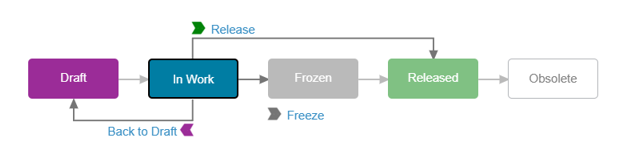
The different maturity states used in a Product’s lifecycle are.
1. Draft
2. In-work
3. Frozen
4. Released
5. Obsolete
Draft The Draft is the initial or early stage in the product’s lifecycle. Draft is the state which can be considered as a “Designer’s workspace” stage, where, the Designer who developed the idea/concept of the product will be the only person actively working on the product. This stage also means that the product has not yet entered the Collaborative work phase, where other designers/engineers can also collaborate to develop the product further.

In Work
The In Work state of the product lifecycle is usually the starting point of Design of the product. In this state, the team of designers or engineers can actively collaborate to develop the product by incorporating their designs or concepts. The design team edits the product several times to modify the geometry, add features, change the dimensions and make other design changes. Keeping the maturity state to In Work, makes it clear that the product is still under development. In case the designer feels that the design is not complete enough for collaboration, it is moved back to the Draft stage. This can be achieved by clicking on the “Back to Draft”.
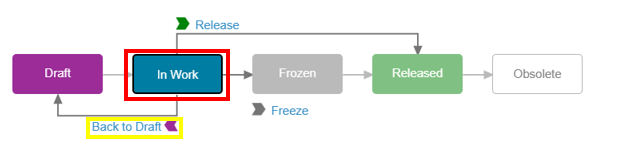
Frozen
The Frozen state is that maturity state in the product’s lifecycle stage that indicates the temporary freezing of any design changes for the product. The freezing is required when, the initial stage of the design which is completed in the In-work stage and needs to be reviewed by someone before it is moved to the next maturity state of ‘Release’. Freezing the design provides greater control over the data while it is being evaluated. This state also prevents any unplanned modifications to the design. In case the evaluation team finds that the design needs to be changed, then the product is moved back to the In-work state. This can be achieved by clicking on the “Back to In-work”.

Release
Released maturity state indicates that the product’s design is completed and has been approved for manufacturing. Once the product’s design is thoroughly evaluated as per the organization’s policies or procedures, it is released for the next downstream operations, namely manufacturing etc. The Released maturity state can be changed to “Obsolete” by clicking on “Make Obsolete”.

Obsolete
The obsolete maturity state indicates the product’s design is no longer intended for active use. This state is generally reached when the required number of components are manufactured or a new design of the product has to be replaced for the older one. However, it is important to note that the older designs need to be preserved for reference, traceability and understanding previous product configurations.

Conclusion
- Maturity states provide a structured lifecycle management approach for product data, ensuring every design progresses through clearly defined stages from creation to retirement.
- Draft state enables designers to develop and refine initial concepts independently before introducing them into a collaborative environment.
- The Work state supports team collaboration, allowing multiple designers and engineers to contribute, review, and improve the product design.
- Frozen state safeguards design integrity by preventing unintended modifications while the design is being reviewed and evaluated.
- Release state confirms design approval, ensuring that only validated and authorized product data moves forward to manufacturing and other downstream processes.
- Obsolete state preserves historical design information, maintaining traceability and reference data even when a product is no longer in active use.
- Effective use of maturity states reduces version conflicts, data duplication, and design errors, which are common challenges in traditional file-based product development.
- By leveraging maturity states in 3DEXPERIENCE SOLIDWORKS, organizations can improve collaboration, enhance data governance, and achieve a more controlled and efficient product development process.
Author Details:

Pradeep G V is a Product Specialist in SOLIDWORKS and allied solutions at Conceptia Technologies Ltd, Bangalore. A key member of the technical support team for the past three years, Pradeep brings over a decade of experience spanning both academia and industry. His deep expertise and practical insights make him a valuable resource for customers and engineering professionals alike.