

In Plastics Injection molding, the critical task lies when you are simulating a family or multi-cavity molds to optimize the process and ensure high-quality production. But, these simulations becomes at times, time-consuming based on the complexity. Simulating each cavity individually involves computationally challenging in terms of time and resources.
With SOLIDWORKS Plastics Simulation, we can reduce the time involved without any compromise in accuracy using the Symmetry or cyclic condition. These options come in handy when you require to work with circular or radial mold cavities (cyclic) or while focusing on a geometrically symmetric mold cavities (symmetry) by focussing on a fraction of the mold.
Key Benefits of using Cyclic/Symmetry Conditions:
- Reduced Simulation analysis run time – cuts down computation time by up to 50 – 75%
- Less memory and CPU usage – allowing us to faster iterations
- Accurate results with less effort – it accurately replicates the mold behaviour without requiring entire geometry
- Does not require the entire mold geometry to be created
How to apply Cyclic/Symmetry conditions in SOLIDWORKS Plastics:
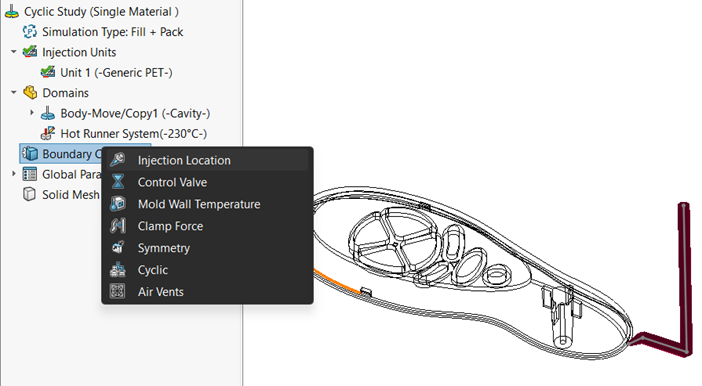
The steps to apply the cyclic/symmetry conditions in the boundary condition are simple and similar. Once you recognize the family or multi-cavity mold, you can apply this condition to create and analyse cavity and runner layouts.
After specifying the cavity, runner system and in the Plastics study, under the boundary conditions, you can specify either symmetry or cyclic condition.
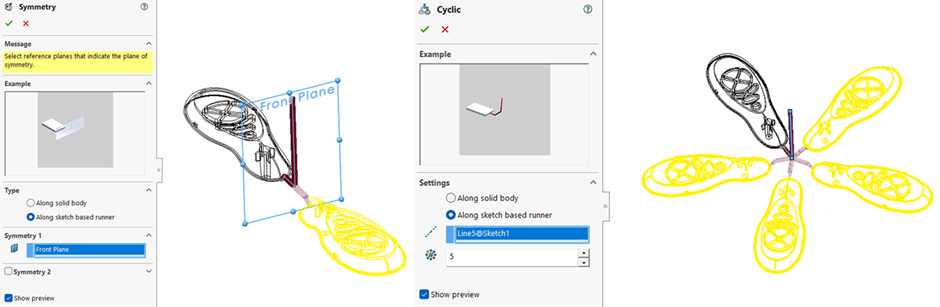
Firstly, under the Symmetry option, we can specify the type of geometry condition i.e. along solid body or along sketch-based runner. Also, in addition to one symmetry plane input, we can select another plane selection for 2nd symmetry.
For Cyclic condition, we are required to provide an axis and no. of components to create pattern of mold cavity.
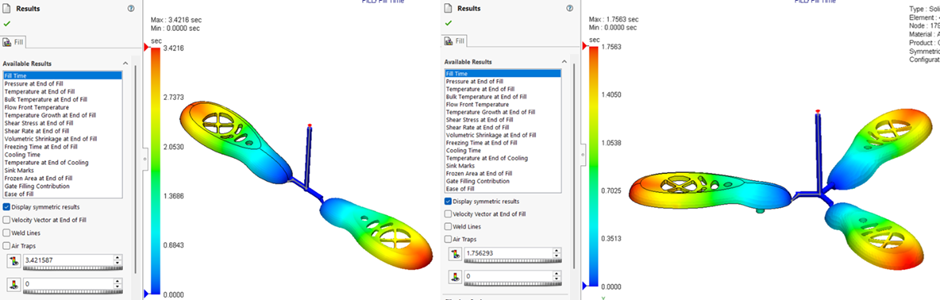
Once this is done, we can run the plastic simulation study after meshing. Then to validate the results of symmetry or cyclic mold cavities, we can enable the option of “display symmetric results” and go through the same.
So, in this article, we have seen how we can employ the cyclic and symmetry conditions for scenarios such as simulating family or multi-cavity molds. This is a powerful way to reduce process time, optimize resources and maintain accuracy. By applying these conditions, mold designers and engineers can improve simulation by accelerating design cycle & improving productivity.
If you wish to know more about SOLIDWORKS Plastics Simulation, do reach out to us at marketing@ckonnect.in
About Author:

Ramesh Aravind is a Customer Success Associate based out of Chennai, Tamil Nadu. He has completed Master’s in Engineering with specialization in Industrial Metallurgy. He had joined Conceptia Konnect team in August, 2022 and has a good experience in SOLIDWORKS & 3DEXPERIENCE Works solutions.