

Whatever product we create, regardless of the problem it solves, if it cannot be manufactured efficiently, it may fail or may never be released. Imagine a tool within SOLIDWORKS that helps design engineers check the design for manufacturability and generate cost estimates within a few clicks.
SOLIDWORKS Costing is a feature-based cost estimation tool that shows how each design change impacts manufacturing cost.
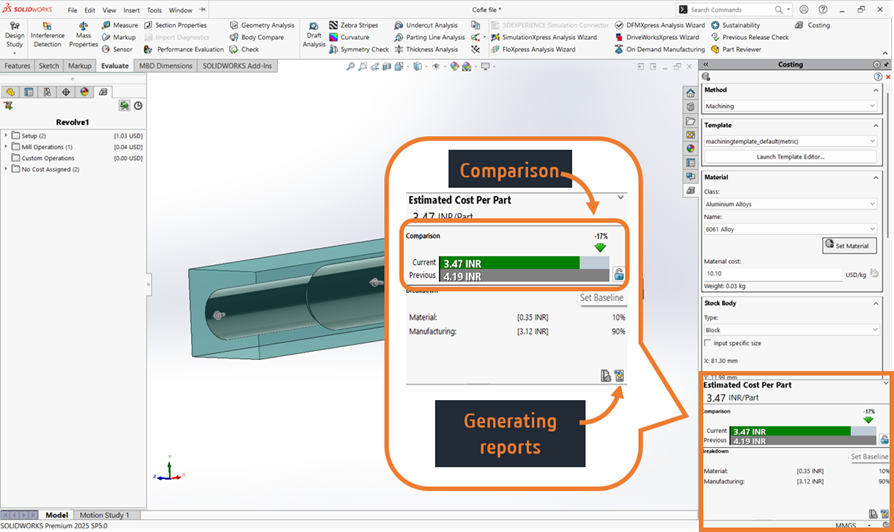
Note: The Costing tool is available in the Evaluate tab in both SOLIDWORKS Professional and SOLIDWORKS Premium.
How does SOLIDWORKS Costing work?
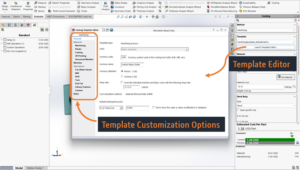
SOLIDWORKS Costing calculates manufacturing cost based on costing template data. These templates are fully customizable in the Costing Template Editor to match your company standards and include parameters such as:
- Material cost per kg
- Machine cost per hour
- Labour cost per hour
- Tool material removal rates
- Set-up and operation costs
Using this data along with automatic feature recognition, SOLIDWORKS evaluates operations such as milling, drilling, turning, cutting, bending, and other manufacturing processes to generate a cost estimate per part.
Beyond primary manufacturing, secondary processes like painting, electroplating, and other treatments can also be included by defining them as custom features in the Costing Template Editor.
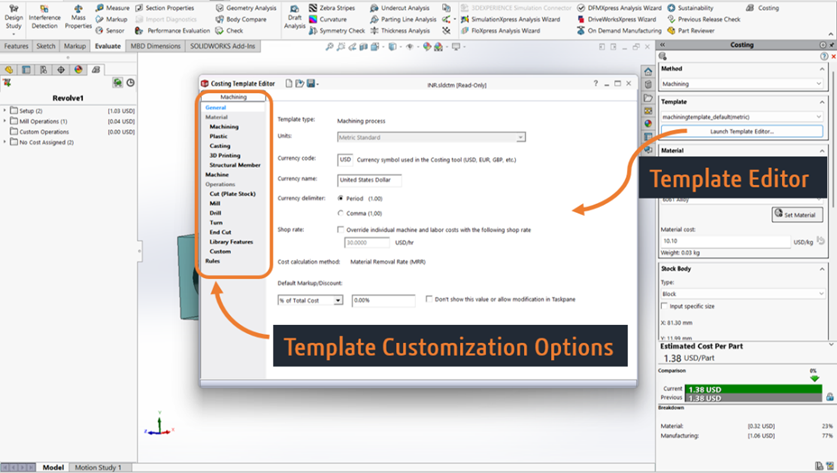
Once a customized template is created, users can enter the required inputs to begin cost estimation. Detailed reports can be generated within a few clicks, including company details, customer information, estimate numbers, and quotations for different quantities.
To summarize, SOLIDWORKS Costing is an under-utilized tool that, when accurate input data is defined with support from the purchase and manufacturing teams, enables consistent and repeatable quotations in just a few clicks. To learn more about SOLIDWORKS Costing or to get support, feel free to contact us at [email protected].