

In modern engineering and manufacturing environments, teams depend on accurate product structure information to ensure seamless design, production, and procurement processes. SOLIDWORKS PDM delivers powerful solutions that make BOM (Bill of Materials) management easier, clearer, and more reliable.
Two of the most effective solutions provided by SOLIDWORKS PDM are the Flattened BOM view and the Indented BOM view. These tools allow users to visualize assemblies in different formats depending on their workflow needs.
INDENTED BOM View
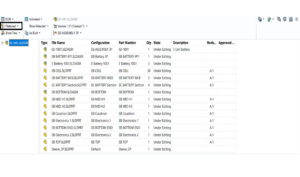
The Indented BOM displays an assembly structure in detail and across multiple levels, providing an easy way to view the assembly components. It provides an easy view of subassemblies, child components, and their levels, so the user can visualize with great detail how parent–child components are structured. Also, by representing the actual engineering structure of the product, the Indented BOM shows relevant dependencies, can verify design accuracy, and validate that each component exists and is where it is intended. This structured view adds tremendous clarity to design review, manufacturing planning, and documentation preparation.

Flattened BOM View
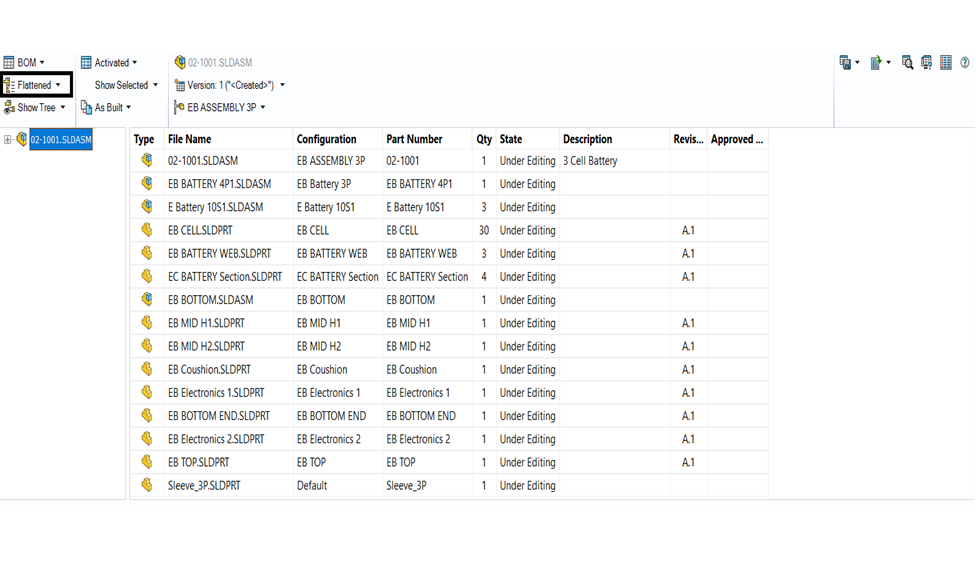
In SOLIDWORKS PDM, the Flattened BOM solution creates a list of all the components in an assembly that is not hierarchical, meaning that quantities are merged to simplify the view of what is required. This ultimately provides the purchasing team with a total part quantity in an entire list, allowing them to procure the necessary items faster, and with better efficiency.
The manufacturing team benefits from this, as they can read through every necessary component for production without having to look through subassemblies and returning back up to the summit.
Inventory planning is also enhanced, because you know the count of all items in one place, and you can estimate the costs quicker with more reliability.
How this Solution work together
SOLIDWORKS PDM allows users to seamlessly switch between Indented and Flattened BOM views, ensuring that every department gets the information it needs in the most effective format.
With these two solutions working together, engineering teams gain a detailed understanding of the complete product structure, while procurement receives clean, consolidated part lists for efficient purchasing.
Manufacturing benefits from clear and accurate material requirements, helping them plan production with confidence.
At the same time, management enjoys full visibility into the product breakdown, supporting better decision-making across the organization.
SOLIDWORKS PDM provides teams with the flexibility to get the right data at the right time with its Flattened and Indented BOM Views. These features allow organizations to work more intelligently, communicate more efficiently, and maintain full control of product information. PDM allows for multi-level transparency with simplified material summaries, to connect design to manufacturing. Stakeholders from engineering, manufacturing, quality, and purchasing can always have the clarity they need to execute their tasks efficiently, avoid rework, and ensure consistent product quality.