

In general, the use of multiple gate injection points is to ensure filling and reducing flow imbalances in injection molding. However, it is crucial to analyse the fill contribution of each gate to optimize the part quality and preventing issues like weld lines, air traps or uneven packing. In this article, we will cover how you can effectively validate the influence of each gate in the fill process leading to better mold design and process performance with SOLIDWORKS Plastics Simulation.
Why Gate Fill contribution is critical?
- It ensures balanced filling of mold cavity and analyses contribution of each gate in the filling process.
- Lowers the overall cycle time.
- Prevents short shot defect or over-packing condition in the mold-cavity
- Ensuring proper gate placement reduces the effects such as occurrence of weld lines, sink marks and voids in the mold cavity
How to analyse the gate fill contributions in SOLIDWORKS Plastics:
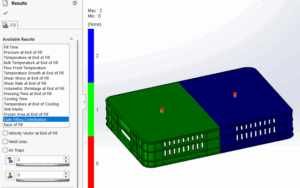
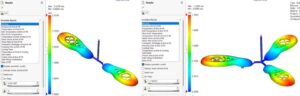
In SOLIDWORKS Plastics Simulation Standard, we can analyse the filling of a complex mold cavity having multiple injection locations. Once we run the fill analysis for similar type of mold cavity, we can check the contribution by each gate using the “Gate Fill Contribution” plot under the Fill Results. In the plot, we can understand from the number, which part was filled by which gate.

Also, it shows us in case of short shot, where it occurs with zero numeric for identification, by which we can make corrective action (adding multiple injection location or changing flow rates/diameter of injection location).
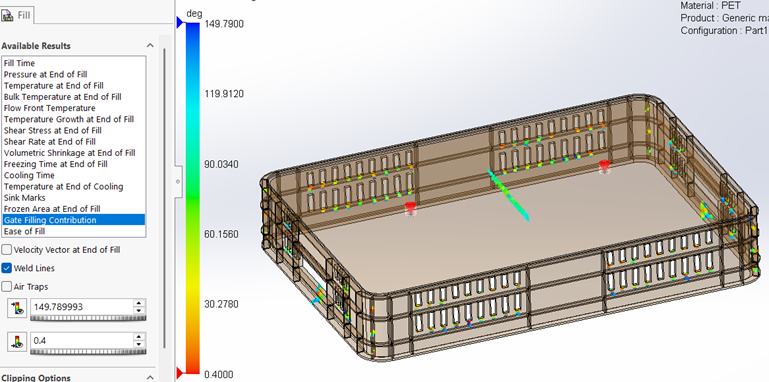
With respect to weld line defect, we can identify the same & make necessary changes in the setup (by appropriate gate addition/modification).
In this article, we have seen how the gate fill contribution plot helps us understand the filling of complex molds with multiple injection points and analyse the defects.
If you wish to know more about the SOLIDWORKS Plastics Simulation, kindly reach out to us at [email protected]
Author Details:

Ramesh Aravind is a Customer Success Associate based out of Chennai, Tamil Nadu. He has completed Master’s in Engineering with specialization in Industrial Metallurgy. He had joined Conceptia Konnect team in August, 2022 and has a good experience in SOLIDWORKS, Simulation & 3DEXPERIENCE Works solutions.